


Website Redesign Steps: A 2026 Guide for Business Owners
- Pawan Samarakoon
- 23 hours ago
- 9 min read

TL;DR:
A website redesign follows six key phases: discovery, information architecture, visual design, development, content migration, and launch. Proper adherence to each step prevents costly rework, SEO loss, and scope creep, ensuring a successful outcome. Involving stakeholders at every stage and investing in discovery and SEO planning are crucial for timely, budget-friendly results.
Website redesign steps are the structured, sequential actions that guide business owners and web managers through refreshing or rebuilding a website to improve user experience and performance. A methodical process matters because skipping phases creates costly rework, SEO ranking drops, and missed business goals. Simple visual refreshes start around $1,500, while enterprise builds exceed $100,000, so understanding each phase protects your budget. Loombranddesigns works with businesses across all scales to execute redesigns that deliver measurable results without the common pitfalls.
What are the essential website redesign steps to follow?
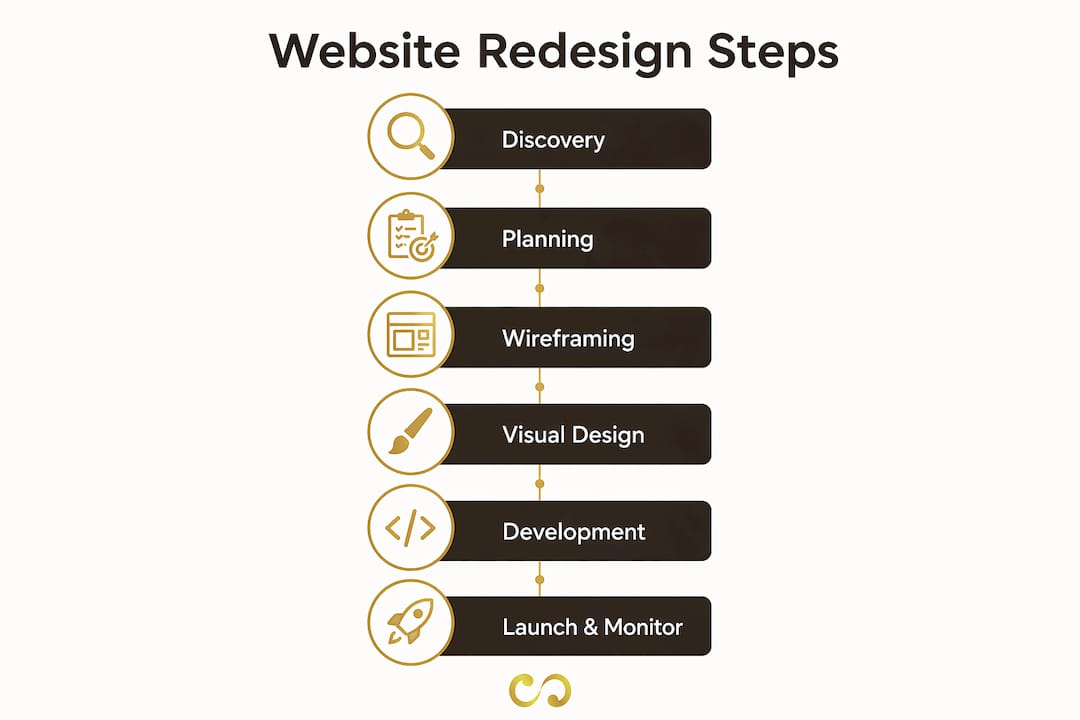
A website redesign project, formally called a website revamp process in agency practice, follows six distinct phases: discovery, information architecture, visual design, development, content migration, and launch. Each phase builds on the last. Skipping discovery to save time almost always causes scope creep later, costing more than the time saved.
The six phases break down like this:
Discovery and planning: Define goals, audit existing content, and align stakeholders
Information architecture: Build site maps, user flows, and wireframes
Visual design: Create style guides, mood boards, and high-fidelity mockups
Development: Write code, integrate systems, and build out pages
Content migration and SEO: Move content, map redirects, and preserve metadata
Launch and monitoring: Deploy, promote, and track performance
Business owners who treat these as a checklist rather than a sequence tend to run into trouble. Development cannot start without approved designs. Designs cannot start without a validated site map. The sequence is not arbitrary.
What prerequisites and planning do you need before starting a redesign?
Discovery is the most underestimated phase of any site redesign. Discovery costs 15–20% of the total redesign budget, typically $5,000–$15,000 over 2–4 weeks. That investment pays back by preventing misaligned designs and wasted development hours.
Start with three foundational tasks before any design work begins:
Define business goals: What specific outcomes do you want? More leads, lower bounce rate, faster load times? Vague goals produce vague results.
Conduct user research: Run at least five user interviews or review session recordings. Real user behavior often contradicts what internal teams assume.
Audit existing content and SEO: Catalog every page, its traffic, its backlinks, and its metadata. Pages with organic traffic need special handling during migration.
Competitive analysis belongs here too. Study how peer sites structure navigation, present offers, and handle mobile layouts. You are not copying them. You are identifying gaps your redesign can fill.
Pro Tip: Allocate at least two weeks for discovery even on small projects. Teams that rush this phase spend the saved time fixing misaligned designs in development, which costs three to five times more to correct.
A content audit table helps you prioritize what to keep, rewrite, or retire:
Content Status | Action |
High traffic, accurate | Migrate as-is |
High traffic, outdated | Rewrite before migration |
Low traffic, relevant | Consolidate or redirect |
Low traffic, irrelevant | Retire and 301 redirect |
How do you structure and wireframe your new website effectively?
Information architecture (IA) is the blueprint of your site. It defines what pages exist, how they connect, and how users move through them. Wireframing and IA consume 20–25% of the total redesign budget, which reflects how much work this phase actually involves.

Build your site map first. A site map is a simple diagram showing every page and its parent-child relationship. It forces decisions about what content deserves its own page versus what should be consolidated. Most business sites have too many low-value pages and too few well-structured cornerstone pages.
User flow mapping comes next. A user flow traces the path a visitor takes from landing page to conversion. Map at least three core flows: a new visitor discovering your brand, a returning visitor comparing options, and a ready-to-buy visitor looking for contact or purchase options. Each flow reveals navigation gaps.
Wireframes translate the site map and user flows into page layouts. They show content blocks, button placement, and hierarchy without any visual styling. Key pages to wireframe include:
Homepage
Primary service or product pages
Contact or conversion page
Blog or resource hub index
Pro Tip: Test wireframes with five real users before moving to visual design. A 30-minute usability test at this stage costs almost nothing and regularly surfaces navigation problems that would be expensive to fix after development.
Iteration at the wireframe stage is cheap. Iteration after development is not. Treat wireframe sign-off as a formal milestone, not a formality.
What visual design steps ensure brand consistency and usability?
Visual design translates wireframes into the actual look and feel of your site. Visual design consumes 25–35% of the total redesign budget, ranging from $10,000 to $25,000 for most business sites. That range reflects the difference between applying an existing brand system and building one from scratch.
The phase follows a clear sequence:
Mood boards: Gather visual references that reflect the brand direction. Share two or three distinct directions with stakeholders and get alignment before designing a single page.
Style guide: Document typography, color palette, spacing rules, button styles, and icon sets. A style guide prevents inconsistency across pages and speeds up development handoff.
Design system: For larger sites, a design system extends the style guide into reusable components. Buttons, cards, form fields, and navigation elements all get defined once and reused everywhere.
High-fidelity mockups: Design the homepage and two or three key interior pages at full resolution. These are the pages stakeholders review and approve before development begins.
Accessibility belongs in this phase, not as an afterthought. The Web Content Accessibility Guidelines (WCAG) 2.1 set the standard for color contrast, font sizing, and interactive element sizing. Meeting WCAG AA level protects you legally and improves usability for all visitors, not just those with disabilities.
Loombranddesigns builds visual branding systems that carry through from logo to web design, so your site and your brand identity stay consistent across every touchpoint.
How do you manage development, content migration, and SEO during a redesign?
Development is where the approved designs become a working website. Development costs range from $15,000 to $30,000 for brochure sites and climb significantly for e-commerce or custom web applications. The approach you choose shapes both cost and timeline.
Approach | Best for | Typical timeline | Key risk |
Visual reskin | Existing CMS, minor layout changes | 3–5 weeks | Limited structural improvement |
Full rebuild | New CMS, new architecture | 8–16 weeks | Scope creep without clear specs |
Platform migration | Moving between CMS platforms | 6–12 weeks | SEO and content loss |
Content migration is consistently the phase that delays launches. Content production adds 2–6 weeks of unplanned effort to most redesign projects. The reason is simple: writing new copy, sourcing photography, and getting internal approvals takes longer than teams expect. Assign a dedicated content owner before development starts.
SEO preservation requires its own workstream running parallel to development. Errors in SEO migration can cause up to 60% traffic loss. That number represents months of recovery work. Avoid it by executing these steps before launch:
Audit every live URL and its current ranking
Build a 301 redirect map for all changed or removed URLs
Migrate page titles, meta descriptions, and header tags
Update all internal links to reflect new URL structures
Submit the new XML sitemap to Google Search Console on launch day
Understanding how SEO integrates with your redesign from the start prevents the traffic drops that catch most business owners off guard after launch.
Pro Tip: Run a full crawl of your staging site using a tool like Screaming Frog before launch. It surfaces broken links, missing metadata, and redirect chains that manual review misses every time.
Redesign projects cost 15–40% more than new builds because of hidden complexities like legacy content and redirect mapping. Budget for these tasks explicitly rather than treating them as minor line items.
How do you prepare for launch and monitor performance afterward?
Launch is not the finish line. It is the start of a new performance cycle. A structured launch process prevents the chaotic post-launch scramble that erases weeks of careful work.
Follow these steps in order:
Complete final QA. Test every page on desktop, tablet, and mobile. Check forms, checkout flows, and interactive elements. Confirm all 301 redirects resolve correctly.
Get stakeholder sign-off. A formal approval from decision-makers protects the project team and creates a clear record of what was agreed.
Coordinate the launch window. Schedule the go-live during low-traffic hours, typically early morning on a Tuesday or Wednesday. Avoid Fridays.
Announce the launch. Send an email to your list, post on social channels, and update your Google Business Profile if applicable.
Monitor analytics for 72 hours. Watch for traffic drops, high bounce rates on key pages, and form submission failures. Address issues within hours, not days.
Submit your sitemap. Log into Google Search Console and submit the updated XML sitemap immediately after launch.
Schedule a 30-day review. Compare organic traffic, conversion rates, and page speed against pre-launch benchmarks. Use the data to prioritize the first round of post-launch improvements.
Continuous improvement after launch separates successful redesigns from ones that stagnate. Collect user feedback through on-page surveys and session recordings. Let real behavior drive the next iteration.
Key Takeaways
A successful website redesign requires six sequential phases, with discovery, SEO preservation, and content readiness being the three most commonly underestimated areas.
Point | Details |
Discovery sets the foundation | Allocate 15–20% of your budget to discovery to prevent misaligned designs and scope creep. |
Wireframes before visuals | Validate information architecture with real users before investing in high-fidelity design. |
SEO migration is non-negotiable | Map all 301 redirects and migrate metadata before launch to avoid up to 60% traffic loss. |
Content causes most delays | Assign a dedicated content owner early; unplanned content work adds 2–6 weeks to timelines. |
Launch is the start, not the end | Monitor analytics for 72 hours post-launch and schedule a formal 30-day performance review. |
What I have learned from watching redesigns go sideways
The redesign projects I have seen fail share one pattern: the team treated content as something to handle “later.” Later never comes on schedule. Content production is the most common cause of redesign delays, and the business owners who understand this before the project starts are the ones who launch on time.
Discovery is the other area where I see consistent underinvestment. Teams want to skip straight to design because design feels like progress. But a beautiful site built on wrong assumptions about user behavior performs worse than an ugly site built on real data. User interviews are not optional. They are the cheapest form of insurance a redesign project has.
Scope creep kills more redesigns than technical problems do. The fix is simple but uncomfortable: get written sign-off at the end of every phase before the next one begins. When a stakeholder asks for changes after sign-off, that is a change order, not a revision. Treating it as anything else trains clients and internal teams to treat the project scope as a suggestion.
Unlimited revision rounds are a trap. Define the number of revision rounds in your project agreement before work begins. Two rounds of revisions per deliverable is a reasonable standard. More than that signals that the brief was unclear, and the fix is a better brief, not more revisions.
The business owners who get the most from a redesign are the ones who stay engaged through every phase, not just the kickoff and the launch. Show up for wireframe reviews. Read the SEO audit. Ask questions about the redirect map. Your involvement at each phase is what keeps the project aligned with your actual business goals.
— Pawan
How Loombranddesigns can support your website redesign
A redesign done right requires design, development, branding, and SEO working together from day one. Loombranddesigns delivers all of these under one roof, so nothing falls through the gaps between vendors.

The website design and development service at Loombranddesigns covers the full process, from discovery and wireframing through to launch and post-launch monitoring. For businesses that also need brand identity work alongside their site rebuild, the Standard Branding Package combines brand strategy and design into a single coordinated engagement. SEO preservation is built into every project, not added as an afterthought. If your redesign needs to protect existing rankings while building toward new ones, the SEO service runs parallel to development from the start.
FAQ
What are the basic website redesign steps?
The core steps are discovery and planning, information architecture, visual design, development, content migration with SEO preservation, and launch with post-launch monitoring. Each phase must be completed and signed off before the next begins.
How long does a website redesign take?
Timelines range from 3 to 16 weeks depending on project complexity. Simple visual refreshes take 3–5 weeks, while full platform migrations or enterprise rebuilds run 12–16 weeks.
How do I preserve SEO during a website redesign?
Audit all live URLs before launch, build a complete 301 redirect map, migrate all metadata, and submit your new XML sitemap to Google Search Console on launch day. Following the SEO optimization process during migration prevents the traffic losses that catch most teams off guard.
Why do website redesigns go over budget?
Redesign projects cost 15–40% more than new builds because of hidden tasks like SEO redirect mapping, legacy content decommissioning, and unplanned revision rounds. A detailed discovery phase and formal sign-off at each milestone are the most effective controls.
When should a business redesign its website?
A redesign is warranted when the site no longer reflects the current brand, conversion rates are declining, the site fails on mobile, or the content management system cannot support business needs. Performance data, not aesthetics alone, should drive the decision.
Recommended
Comments